AFL Sports Data Warehouse Is Now Available
We are pleased to announce that access to the AFL Sports Data Warehouse is now available for use. This article provides a brief overview of what the Warehouse contains and how you can get access to it.
What does the Warehouse contain?
The Warehouse contains the following Leagues:
- AFL Premiership Seasons 2019 - 2025 [API League Id 1]
- AFLW Seasons 2017 - 2025 [API League Id 3]
Pre-Season Leagues (Ids 2 and 4 respectively) are currently not available but will be loaded in the near future. Likewise, Tier 2 Competitions are a priority item to be added to the Warehouse in 2026.
Can I use the Warehouse for live matches?
The Warehouse is not updated with live match activity. Once a match has been played and marked Complete, it is updated in the Warehouse. As a result, matches in the Warehouse typically jump to the ‘Complete’ status and do not pass through the usual statuses that a match does when watched via the AFL API.
You should continue to use the AFL API for all live match data use.
Presently the Warehouse is not updated with selected teams on the same schedule, so there may be delay between the Warehouse showing the selected teams and changing to the ‘Unconfirmed/Confirmed Teams’ status.
How is the Warehouse laid out?
There are currently three ‘namespaces’ of tables and views in the Warehouse:
- FIXTURES - content specific to competitions and seasons, notably each season’s fixture and all the matches within it
- REFERENCE - content that helps describe the content in each season and match. Also includes the Glossary table which provides a list of all the metrics, their descriptions and how they are calculated
- STATISTICS - match stats are stored here, both player and squad stats
Every match is in the Warehouse, accompanied by their player and squad statistics. Each stat is presented by the following dimensions:
- Period
- Logical Zone (i.e. D50, AM)
- Physical Zone (i.e. L50, RM)
- Whether the stat happened pre- or post-clearance
The Warehouse provides a set of views on the stats that roll them up into commonly queried dimension sets, so you don’t have to start each query by aggregating stats to remove the dimensions you are not interested in.
How do we get access to the Warehouse?
1. Return the completed AFL 2026 Order Form
Access to the Warehouse is included with the 2026 order and granted after you return the 2026 order form.
2. Already using Snowflake?
Access to the AFL Warehouse will be via a Snowflake data share. This provides a direct connection to the Warehouse and appears as another database in the catalog for your use.
To set up the data share, please email Champion Data support with your Snowflake Account Locator. We will create the share, let you know we've done it, then the next time you refresh Snowflake the Warehouse will appear.
Use of any Snowflake data share, including the AFL Warehouse will use up the credits you have bought via your own account. Champion Data does not ask for any additional charge for Warehouse access.
Finding your Account Locator
To find the locator for an account, you can use Snowsight (Snowflake's Web App) or SQL.
Snowsight
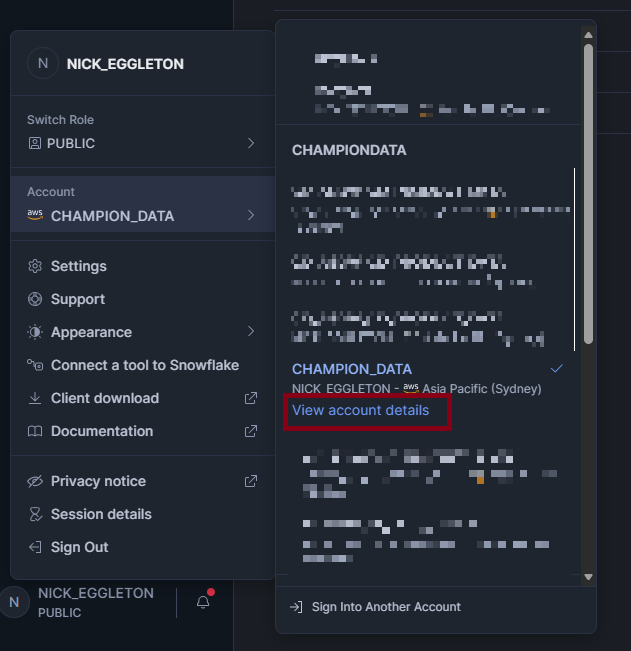
- Open the account selector and select your Snowflake account
- Select 'View account details'
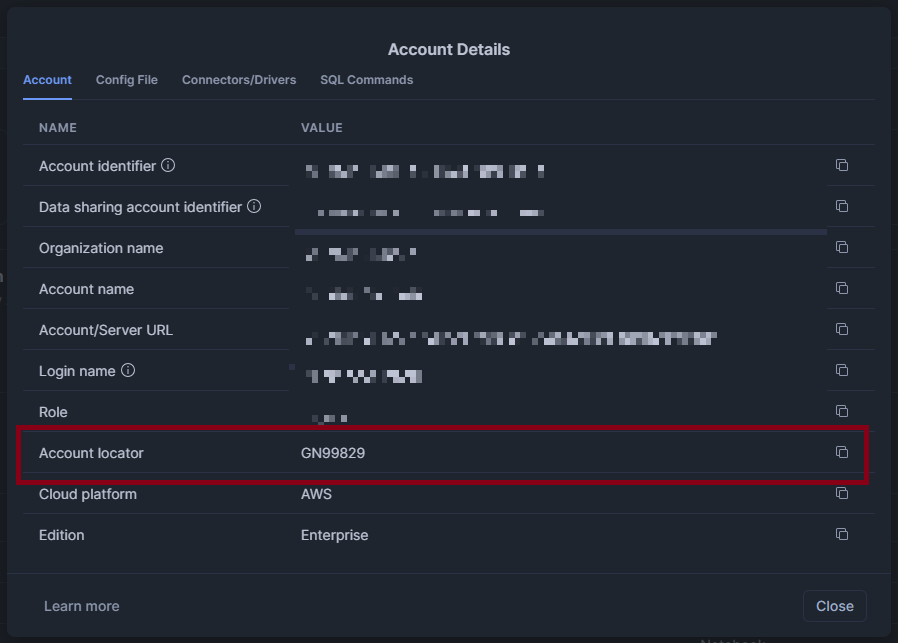
- The Account Details dialog displays information about the account, including the account identifier and the account URL.
- You can copy the account locator from the Account Locator field.
SQL
You can call the following function to identify the account locator for the Snowflake account you are connected to:
- Call CURRENT_ACCOUNT() to retrieve the account locator.
3. Not using Snowflake?
Snowflake is required to access the AFL Warehouse. If you do not wish to set up an account with Snowflake, we can provide access to the Warehouse via an account created by Champion Data. This account does not provide the full capabilities that Snowflake offers and the number of credits you can use per month is capped. We encourage clubs to set up their own Snowflake account to get the best experience from the Warehouse.
Unlike other Champion Data products, we do not create individual user accounts to access the Warehouse in this way. Instead, we create an administrator account, send you the details and you use the account to make user accounts as you see fit.
To arrange set up of a Champion Data Snowflake Account, please email Champion Data support with a nominated person's email address, who will act as your Warehouse account admin.
What’s next?
We will be publishing a set of articles, be it example queries, reports, videos or dashboards, to demonstrate how to the use the Warehouse. This will cover the following:
- Match Statistics Aggregation
- Creating Summary Views with stat columns
- Using the Metric Glossary to calculate percentage metrics
- Querying the Warehouse from Power BI/Tableau
Mini-roadmap to end of March
These are the upcoming improvements to the roadmap through the start of the season. Towards the end of March we will publish a more comprehensive roadmap for all AFL products to the end of the season.
- MATCH.TRANSACTIONS Table - access transactions from every match from one table
- STATISTICS.FLOW Table - timecoded occurrences of metrics from every match from one table
- Elite Package content - 45 Kick and Speed of Ball Movement metrics
- Pre-Season Leagues
- Enhancing tables and views with more data
- Responding to your feedback (if we get it soon!)
Access to the AFL Sports Data Warehouse is subject to acknowledgement of a Service Level Agreement (SLA). The SLA for 2026 will be sent to clubs prior to the start of the AFL season. This includes reference to acceptable use and third-party access to data.
Got a Question or an Issue?
Please email Champion Data support with any questions or issues you might have with accessing the Warehouse or its contents.